
Mastering Cash Flow Calculations with the BAII Plus Financial Calculator
CFA FRM
I. Introduction
Cashflow is a crucial financial metric that represents the net cash inflow and outflow of a business or individual over a specific period. It is essential for understanding the financial health and liquidity of an entity. Financial calculators provide a convenient and efficient way to calculate cashflow, allowing for quick and accurate results. In this guide, we’ll explore the essential variables involved in cashflow calculations and demonstrate how to use a financial calculator effectively.
II. Understanding the Key Variables
Cash Flow: The movement of money into and out of a business or project over a period of time.
Cash Inflows: Money coming into the business (e.g., sales revenue, loan receipts).
Cash Outflows: Money leaving the business (e.g., expenses, loan payments).
Net Cash Flow: The difference between cash inflows and cash outflows.
I (Interest/Discount Rate): Sets the discount rate used for NPV calculations.
NPV (Net Present Value): Determines if the net monetary gain from a project exceeds its cost.
IRR (Internal Rate of Return): Represents the annualized effective compounded return rate, which can be used to compare the profitability of different projects.
III. Steps for Calculating Cash Flow
Open Online Financial Calculator: Let’s first open BA II Plus Emulator Online as a reference:
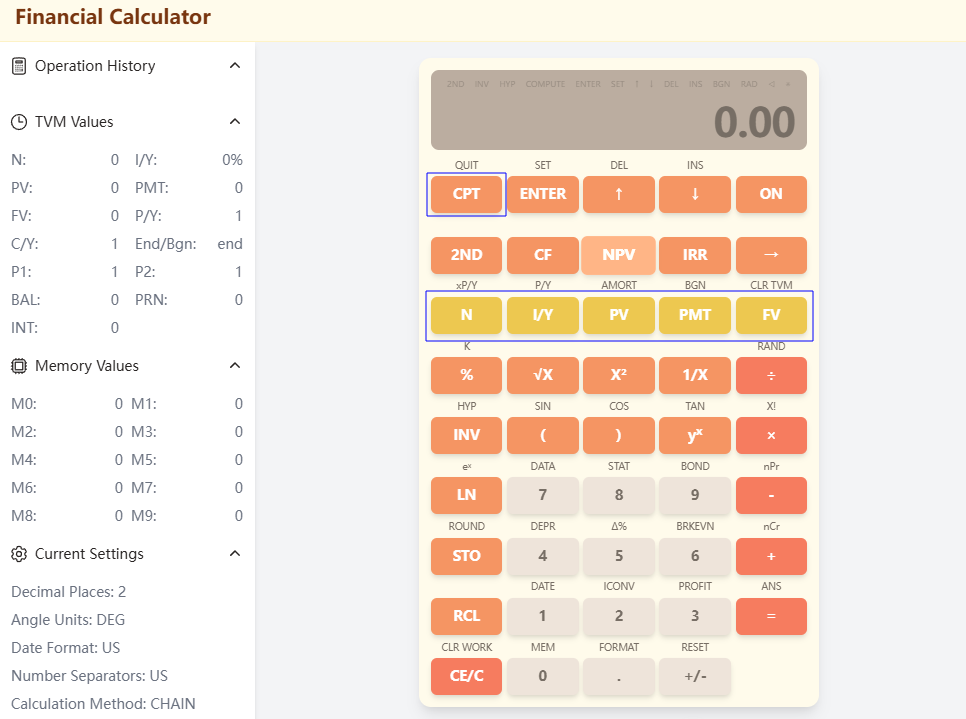
1.Input the Initial Cash Flow: Press CF to enter cash flow mode, then input the initial investment.
2.Input Subsequent Cash Flows: Press ↓ to enter subsequent cash flow.
3.Input the Discount Rate: Press NPV to enter the discount rate.
4.Calculate Net Present Value (NPV): Press ↓ and CPT (compute) to calculate the NPV.
5.Calculate Internal Rate of Return (IRR): Press IRR and CPT (compute) to display the IRR.
IV. Example: Project Cash Flow Analysis
You are considering investing in a project that has an initial start-up cost (outlay) of $1,000. The project is expected to generate cash inflows of $400 in the first year, $500 in the second year and third year. You want to find out the Net Present Value (NPV) and the Internal Rate of Return (IRR) to evaluate if the project is worth investing in, given a discount rate of 8% per annum.
Step 1: Clear the Cash Flow Worksheet
Press CF and 2nd, then CLR WORK (this is second function of the CE/C key).
Step 2: Enter the Cash Flows
-
Press CF to enter Cashflow mode, then input -1000 (to indicate this is an initial outflow), and press ENTER
-
Press ↓ to enter C01 (first cashflow) then input 400 and ENTER
-
Press ↓ twice to enter C02 (second cashflow) , then 500 ENTER
-
Press ↓ to enter F02 (second cashflow frequency) then 2 ENTER
Step 3: Calculate the NPV
-
First, set the discount rate: Press NPV to show Discount Interest, input 8 ENTER (to set an 8% discount rate).
-
Then calculate the NPV: Press NPV, then press CPT to calculate. Answer is $195.96.
Step 4: Calculate the IRR
After verifying your cash flows are correct: Press IRR, then CPT to calculate the IRR. Answer is 18.14%.
V. Interpreting the Results: Making Informed Decisions
After obtaining NPV and IRR, it’s time to analyze the results and make informed financial decisions.
NPV Interpretation: A positive NPV suggests the investment is expected to generate a return above the required discount rate, making it potentially profitable. A negative NPV indicates the project might not generate enough return to cover the initial investment.
IRR Interpretation: An IRR exceeding the required rate of return indicates a potentially profitable project, while an IRR below the required rate suggests the investment might not be worthwhile.
VI. Additional Notes:
- The calculator can handle both positive and negative cash flows.
- For projects with unequal time periods between cash flows, the calculator can be used to calculate the NPV and IRR for each individual period.
- Remember to clear the calculator memory before starting a new calculation.
VII. Conclusion
By mastering the use of the BAII Plus calculator for cash flow analysis, you gain a powerful tool for making informed financial decisions. Remember to practice with sample cash flow scenarios to familiarize yourself with the process and refine your skills. Further explore the BAII Plus’s functionalities to expand your financial analysis capabilities and confidently navigate the world of investments and financial planning.